In this post, we will look at how to connect Spring AI with Langfuse and get complete tracing for LLM calls, tool calling, prompts, and responses.
Below is a demo project built with Spring Boot and Spring AI: an HTTP request invokes an LLM, WeatherTools is used when needed to fetch weather data from the internet, and traces, prompts, and responses are sent to Langfuse through OpenTelemetry and CallAdvisor.
Langfuse is a platform for monitoring and evaluating AI applications. The experience is very similar to LangSmith: you can trace LLM calls, inspect inputs and outputs, track latency and cost, and compare prompts and models. Langfuse also has an open-source version and can be self-hosted, which makes it a good choice for teams that need more control over their data and infrastructure.
The main dependencies in build.gradle:
dependencyManagement {
    imports {
        mavenBom 'org.springframework.ai:spring-ai-bom:2.0.0'
    }
}

dependencies {
    implementation 'org.springframework.boot:spring-boot-starter-web:4.1.0'
    implementation 'org.springframework.boot:spring-boot-starter-opentelemetry:4.1.0'
    implementation 'org.springframework.ai:spring-ai-starter-model-openai:2.0.0'

    compileOnly 'io.opentelemetry:opentelemetry-exporter-otlp:1.62.0'

    testImplementation 'org.springframework.boot:spring-boot-starter-test:4.1.0'
}
Application Configuration
In application.properties, configure OpenAI, Spring AI observability, and the Langfuse OTLP endpoint:
spring.ai.openai.api-key=${OPENAI_API_KEY}
spring.ai.openai.chat.options.model=gpt-5
spring.ai.tools.observations.include-content=true
spring.ai.chat.client.observations.log-prompt=true
spring.ai.chat.client.observations.log-completion=true
spring.ai.chat.observations.log-prompt=true
spring.ai.chat.observations.log-completion=true

management.otlp.metrics.export.enabled=false
management.tracing.sampling.probability=1.0
management.tracing.export.otlp.enabled=${LANGFUSE_TRACING_ENABLED:false}
management.opentelemetry.tracing.export.otlp.endpoint=${LANGFUSE_OTLP_ENDPOINT:http://localhost:3000/api/public/otel}
management.opentelemetry.tracing.export.otlp.transport=http

langfuse.public-key=${LANGFUSE_PUBLIC_KEY:}
langfuse.secret-key=${LANGFUSE_SECRET_KEY:}
Since Langfuse is used for tracing, it is better to disable OTLP metric export. Otherwise, the application may try to send metrics to the same endpoint and get a ConnectException.
management.otlp.metrics.export.enabled=false
Controller
LangfusePromptTracingAdvisor adds the prompt and response to the Langfuse trace.
@RestController
class HelloAiController {

    private final ChatClient chatClient;
    private final WeatherTools weatherTools;

    HelloAiController(
            ChatClient.Builder chatClientBuilder,
            WeatherTools weatherTools,
            LangfusePromptTracingAdvisor langfusePromptTracingAdvisor
    ) {
        this.chatClient = chatClientBuilder
                .defaultAdvisors(langfusePromptTracingAdvisor)
                .build();

        this.weatherTools = weatherTools;
    }

    @GetMapping("/ai")
    String ai(
            @RequestParam(defaultValue = "Say hello in one short sentence")
            String message
    ) {
        return this.chatClient.prompt()
                .user(message)
                .tools(this.weatherTools)
                .call()
                .content();
    }
}
The tool uses Open-Meteo to find the coordinates of a city and retrieve the current weather for those coordinates.
@Component
class WeatherTools {
private final RestClient restClient;
WeatherTools(RestClient.Builder restClientBuilder) {
this.restClient = restClientBuilder.build();
}
@Tool(description = "Get current weather for a city using live internet weather data")
String getCurrentWeather(
@ToolParam(description = "City name, for example Berlin or New York")
String city
) {
GeocodingResponse geocoding = this.restClient.get()
.uri(
"https://geocoding-api.open-meteo.com/v1/search"
+ "?name={city}&count=1&language=en&format=json",
city
)
.retrieve()
.body(GeocodingResponse.class);
if (geocoding == null
|| geocoding.results() == null
|| geocoding.results().isEmpty()) {
return "Weather is unavailable: city not found: " + city;
}
Location location = geocoding.results().getFirst();
ForecastResponse forecast = this.restClient.get()
.uri(
"https://api.open-meteo.com/v1/forecast"
+ "?latitude={latitude}"
+ "&longitude={longitude}"
+ "¤t=temperature_2m,relative_humidity_2m,"
+ "wind_speed_10m,weather_code",
location.latitude(),
location.longitude()
)
.retrieve()
.body(ForecastResponse.class);
if (forecast == null || forecast.current() == null) {
return "Weather is unavailable for " + location.name();
}
CurrentWeather current = forecast.current();
return "Current weather in %s, %s: %.1f C, humidity %d%%, "
+ "wind %.1f km/h, weather code %d."
.formatted(
location.name(),
location.country(),
current.temperature2m(),
current.relativeHumidity2m(),
current.windSpeed10m(),
current.weatherCode()
);
}
private record GeocodingResponse(List<Location> results) {
}
private record Location(
String name,
String country,
double latitude,
double longitude
) {
}
private record ForecastResponse(CurrentWeather current) {
}
private record CurrentWeather(
@tools.jackson.annotation.JsonProperty("temperature_2m")
double temperature2m(),
@tools.jackson.annotation.JsonProperty("relative_humidity_2m")
int relativeHumidity2m(),
@tools.jackson.annotation.JsonProperty("wind_speed_10m")
double windSpeed10m(),
@tools.jackson.annotation.JsonProperty("weather_code")
int weatherCode()
) {
}
}
Sending Traces to Langfuse Through OpenTelemetry
Spring Boot sends traces through the spring-boot-starter-opentelemetry dependency. Langfuse requires Basic Authentication using the public and secret keys. The required environment variables are:
export LANGFUSE_TRACING_ENABLED=true
export LANGFUSE_PUBLIC_KEY=pk-lf-...
export LANGFUSE_SECRET_KEY=sk-lf-...
A separate configuration adds the required HTTP headers:
@Configuration
class LangfuseTracingConfig {

    @Bean
    OtlpHttpSpanExporterBuilderCustomizer langfuseOtlpHeaders(
            @Value("${langfuse.public-key:}") String publicKey,
            @Value("${langfuse.secret-key:}") String secretKey
    ) {
        return builder -> {
            if (!StringUtils.hasText(publicKey)
                    || !StringUtils.hasText(secretKey)) {
                return;
            }

            String token = Base64.getEncoder()
                    .encodeToString(
                            (publicKey + ":" + secretKey)
                                    .getBytes(StandardCharsets.UTF_8)
                    );

            builder.addHeader("Authorization", "Basic " + token);
            builder.addHeader("x-langfuse-ingestion-version", "4");
        };
    }
}
Adding Prompts to Langfuse
Spring AI does not put the prompt and completion into the Langfuse input and output fields in the required format. To solve this, we use the standard Spring AI CallAdvisor mechanism.
@Component
class LangfusePromptTracingAdvisor implements CallAdvisor {

    private final ObjectMapper objectMapper = new ObjectMapper();

    @Override
    public ChatClientResponse adviseCall(
            ChatClientRequest chatClientRequest,
            CallAdvisorChain callAdvisorChain
    ) {
        var span = Span.current();

        String input = serializePrompt(chatClientRequest);

        span.setAttribute("langfuse.observation.type", "generation");
        span.setAttribute("input.value", input);
        span.setAttribute("langfuse.observation.input", input);

        ChatClientResponse chatClientResponse =
                callAdvisorChain.nextCall(chatClientRequest);

        String output =
                serializeResponse(chatClientResponse.chatResponse());

        span.setAttribute("output.value", output);
        span.setAttribute("langfuse.observation.output", output);

        return chatClientResponse;
    }

    @Override
    public String getName() {
        return "Langfuse Prompt Tracing Advisor";
    }

    @Override
    public int getOrder() {
        return ToolCallingAdvisor.DEFAULT_ORDER + 100;
    }

    private String serializePrompt(ChatClientRequest request) {
        var messages = request.prompt()
                .getInstructions()
                .stream()
                .map(message -> Map.of(
                        "role", message.getMessageType().getValue(),
                        "content", ofNullable(message.getText()).orElse("")))
                .toList();
        return toJson(messages);
    }

    private String serializeResponse(ChatResponse response) {
        return ofNullable(response).map(ChatResponse::getResult)
                .map(Generation::getOutput)
                .map(output -> toJson(

                        Map.of("role", output.getMessageType().getValue(),
                                "content", ofNullable(output.getText()).orElse(""),
                                "hasToolCalls", response.hasToolCalls())

                ))
                .orElse("");
    }

    private String toJson(Object value) {
        try {
            return this.objectMapper.writeValueAsString(value);
        }
        catch (JsonProcessingException ex) {
            return String.valueOf(value);
        }
    }
}
According to the Spring AI documentation, ToolCallingAdvisor manages the tool-calling loop itself, while getOrder() determines the advisor's position in the chain. Setting it to ToolCallingAdvisor.DEFAULT_ORDER + 100 places our advisor inside the tool-calling loop, so it runs on every iteration and can observe the original request, the model response that decides to call a tool, the following request containing the tool result, and the final model response.
What You Will See in Langfuse
Example request to the application:
curl "http://localhost:8080/ai?message=What%20is%20the%20weather%20in%20Berlin?"
Langfuse should display a trace with spans.
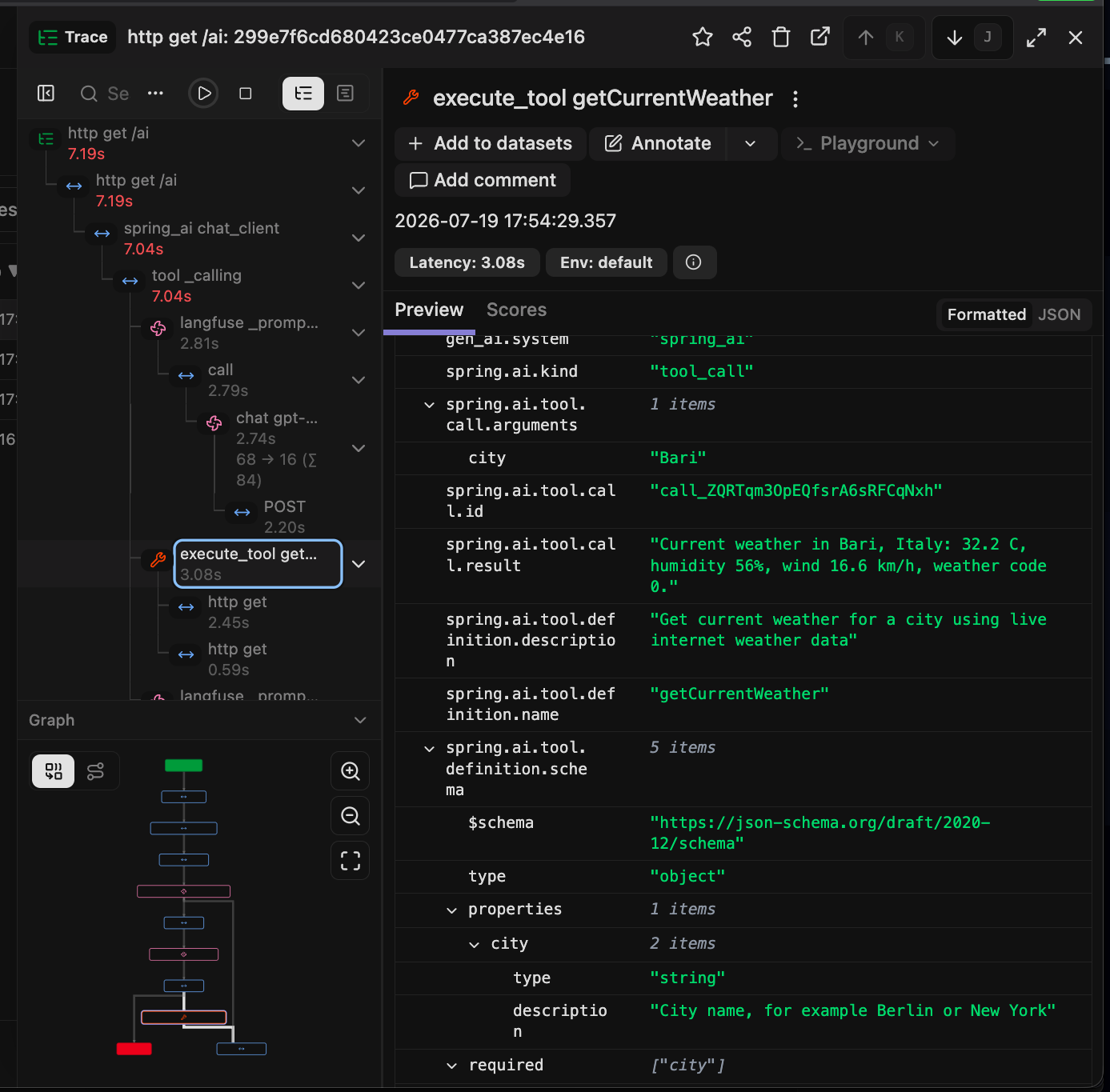
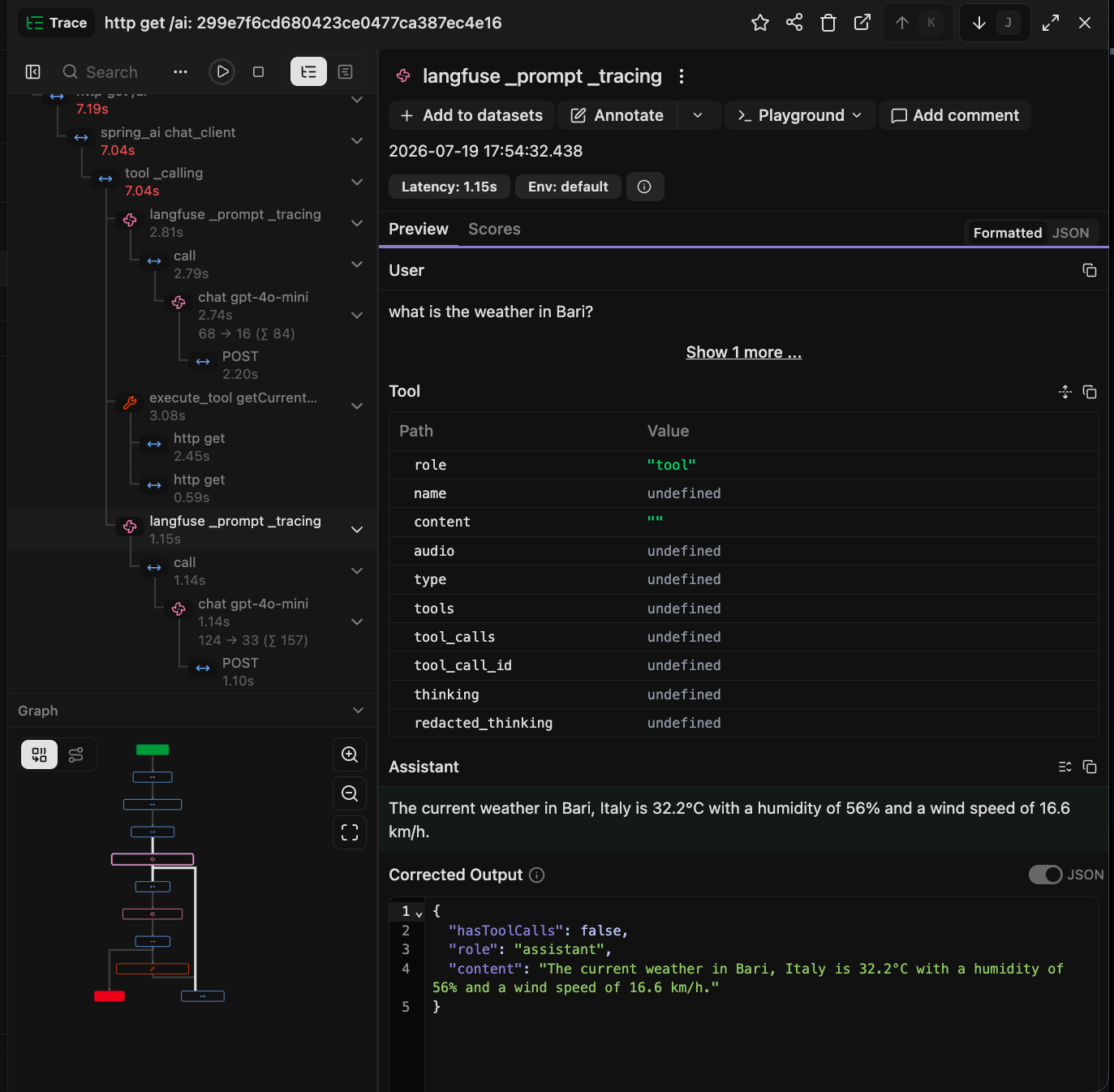
Generation spans will contain attributes such as:
langfuse.observation.type=generation
langfuse.observation.input=...
langfuse.observation.output=...
input.value=...
output.value=...
When the following option is enabled, Spring AI exports tool call arguments and results:
spring.ai.tools.observations.include-content=true
Production Considerations
Prompts, completions, and tool results may contain sensitive data. Traces are also typically stored longer than the application's runtime memory. For production, it is worth adding content truncation, sanitization, secret removal, and PII filtering.
Combining Spring AI Advisors with Langfuse through OTLP provides transparent tracing of LLM calls, prompts, responses, tool calls, and intermediate steps.
